Apply cash in minutes. Not days.

Apply cash in minutes. Not days.

Agents extract remittance data from any source, match payments to open invoices, and post to your ERP. Your team handles the exceptions that need judgment.

Agents extract remittance data from any source, match payments to open invoices, and post to your ERP. Your team handles the exceptions that need judgment.

AR that's clean when the close starts

Payments are matched and posted continuously, not batched at month-end. When the close window opens, your AR balance reflects reality. Your team isn't spending the first three days of close figuring out what's been applied and what hasn't.

Match rates that improve every period

The agent learns from your team's corrections and your customers' payment patterns. First-period match rates are strong. By period three, they're stronger. Rules-based systems plateau. This doesn't.

Unapplied cash trending toward zero

Unmatched payments don't sit in a queue until someone manually reworks them. The agent retries as new data arrives. Your cash position is accurate every day, not just after a month-end cleanup cycle.

Every payment applied. Every balance accounted for.

Read remittances from any source. First time, every time.

The agent extracts invoice numbers, amounts, dates, and customer references from PDFs, emails, EDI files, portal exports, and scanned check stubs: handling format variations and learning new customer formats on first contact. No OCR templates to build and no bank lockbox dependency.

Auto-match payments to invoices. Even the messy ones.

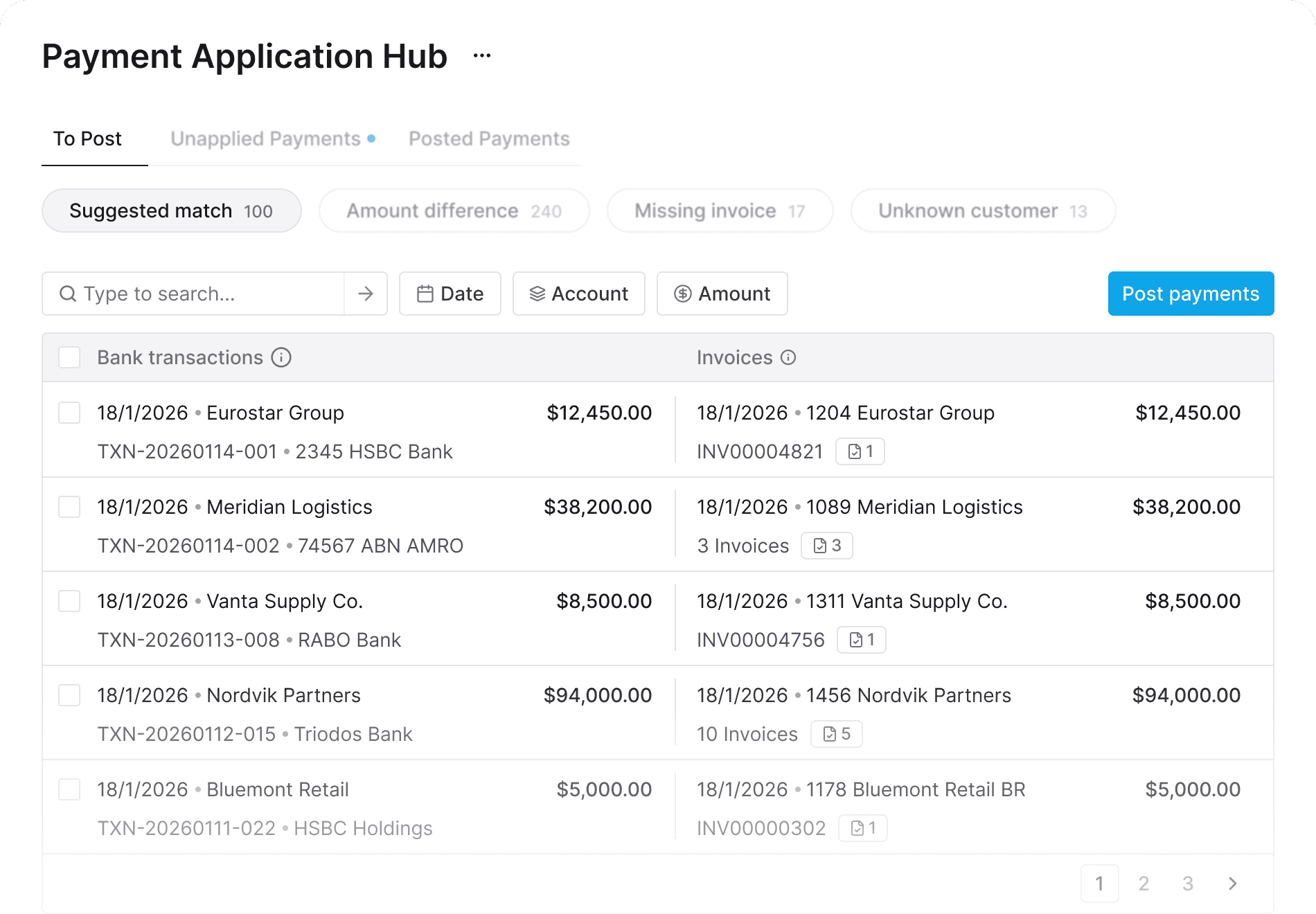
Clean payments match instantly. But the difficult cases: a wire with no remittance, a cheque covering six invoices, a short pay with no explanation, are where most tools stop. The agent uses your historical payment patterns, customer behaviour, and configurable tolerance rules to resolve what rules-based systems can't.

Exceptions routed to the right person with the right context.

When the agent can't resolve a payment, each exception surfaces with the probable cause, the customer's payment history, and a suggested resolution. Your team picks up with context instead of starting the investigation from scratch.

Unapplied payments don't wait for month-end. They resolve themselves.

When a payment can't be matched today, the agent watches for new data: a remittance arriving hours after the wire, an invoice posted later that day, a credit note that changes the open balance, and makes the match automatically when the missing piece shows up. By close, the only exceptions left are genuine items that need human judgment.

Four steps to clean AR at close

  1. Connect

Stacks syncs with your ERP and your bank feeds. Open invoices, customer accounts, and payment data are pulled in automatically. No CSV uploads. No manual reconciliation files.

  1. Capture

The agent monitors your payment sources: bank statements, lockbox files, email inboxes, customer portals. Remittance data is extracted and normalised regardless of format.

  1. Match

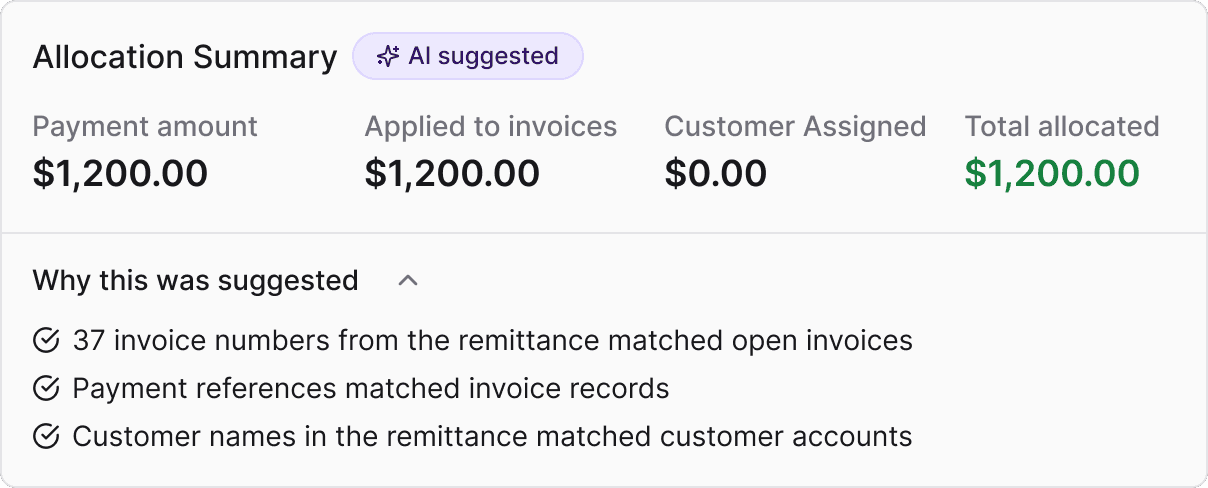
Payments are matched to open invoices using a combination of direct matching, fuzzy matching, amount matching, and pattern recognition from your transaction history. Confirmed matches are documented and staged for posting.

  1. Post & Follow Up

Matched payments are posted to your ERP with a full audit trail. Unmatched payments are routed as exceptions with context. Overdue balances are queued for automated follow-up.


Why Stacks vs. Standalone AR Tools

Standalone AR tools

Payment application lives in a separate system from your close

Payment application is part of the close platform. AR is accurate when the close starts.

Requires a dedicated implementation project for cash application alone

Deploys alongside your existing Stacks close workflows. No separate rollout.

Remittance capture often requires OCR templates per customer format

Agent reads new formats on first contact. No template configuration.

Exceptions sit in an AR queue, disconnected from the close checklist

Exceptions are visible in your close dashboard. Nothing is hidden from the close owner.

Collections and follow-up require a separate tool or module

Overdue balances are tracked and chased within the same platform your team already uses

Match rules are static and need manual tuning

Agent learns from corrections and improves match rates every period

Part of the Stacks close platform

Reconciliations

AI agents match transactions across your subledgers, bank feeds, and GL. Your team reviews exceptions and signs off.

Close management

Every journal, accrual, and working paper prepared against your accounting policies and posted directly to your ERP.

Intercompany

Matching, netting, and elimination entries across every entity in your group. One workflow.

Apply cash in minutes. Close with confidence.

See how Stacks replaces the manual matching, the remittance hunting, and the spreadsheet follow-ups with a single payment application workflow. Connected to your ERP. Audit-ready from day one.

See how Stacks can work for your team. Let's figure out how to cut your month-end close in half — together.